 Image 1 of 1
C:\DRIVE (BETA v0.9.29)
Turn images into distortion.
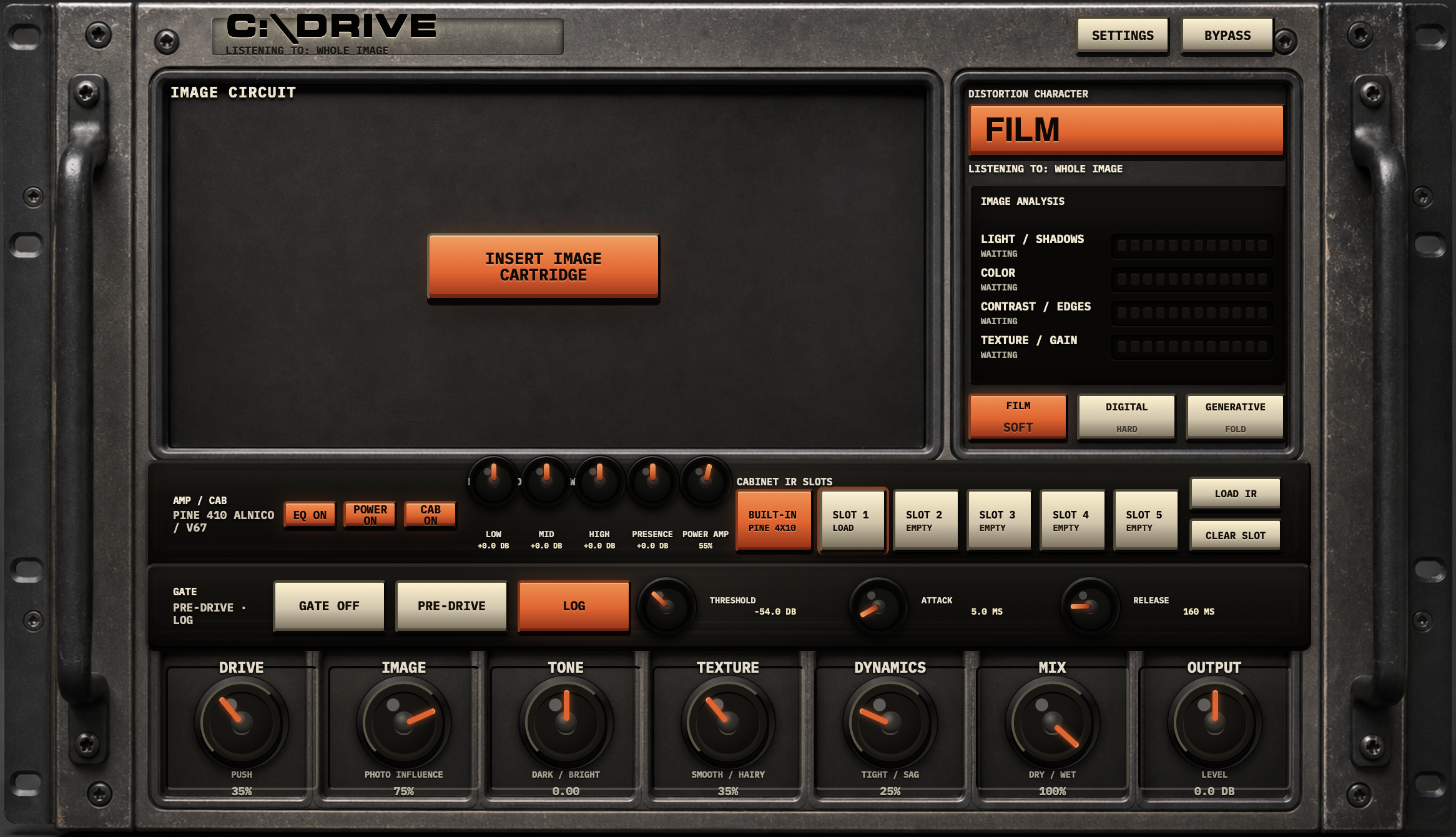
C:\DRIVE is an offline, image-based saturation plugin that turns light, color, contrast, shadows, edges, texture, and grain into a custom overdrive, distortion, or fuzz circuit.
Drop in a photo, artwork, scan, or texture, then move the listening area across the image to reshape the sound. Each selection generates a repeatable visual toneprint that influences the saturation curve, harmonic density, tonal contour, texture, and dynamic response. The image is not decoration—it becomes part of the signal path.
Choose between three distinct circuit characters, shape the result with large tactile controls, and finish the sound through post-drive EQ, an amp-style power section, cabinet processing, and a flexible gate. C:\DRIVE is designed for guitarists, producers, mix engineers, and sound designers who want distortion that feels less generic while remaining practical and controllable.
Features
Image-based saturation engine
Insert an image and generate a repeatable drive character from its visual qualities. Brighter material can produce a smoother, more open response; heavy shadows can push the circuit harder; contrast can add edge; and grain or texture can introduce roughness and hair.
Moveable listening area
Move the listening area across the image to focus on different combinations of color, light, contrast, and texture. Each position can reshape the tone without requiring a different source image.
Three distortion characters
Film
Smoother, warmer, and more natural saturation.
Digital
Sharper, tighter, and more defined clipping.
Generative
Rougher, more aggressive, and capable of folded or destructive character.
Tactile macro controls
Drive: Push the generated circuit harder
Image: Control how much the image shapes the tone
Tone: Move from darker to brighter
Texture: Shift from smooth to hairy
Dynamics: Move from tight to sagging
Mix: Blend the dry and processed signals
Output: Set the final level
Complete tone-shaping chain
Four-band post-drive EQ: Low, Mid, High, and Presence
Amp-style power section inspired by the feel of classic American tube amplification
Original built-in cabinet impulse response
Five user IR slots for custom cabinet responses
Flexible noise gate with threshold, attack, release, curve, and pre-drive or post-IR placement
Mono and stereo processing
Optional stereo-to-mono input summing
Oversampling and automatic gain options
Photoreal, rack-hardware-inspired interface
How it works
01 / Insert an image
Drag in a photo, scan, piece of artwork, or visual texture. C:\DRIVE analyzes its light, shadows, color balance, contrast, edges, texture, and grain locally on your computer.
02 / Find a toneprint
Move the listening area across the image. Different regions produce different combinations of harmonic density, tone, texture, and dynamic response.
03 / Choose a circuit character
Select Film, Digital, or Generative to determine how the visual toneprint is translated into saturation and distortion behavior.
04 / Shape the signal
Use the main macro controls to push, brighten, darken, smooth, roughen, tighten, or soften the generated circuit.
05 / Finish the chain
Refine the sound with the four-band EQ and power amp section, then place it through the built-in cabinet or one of five custom IR slots. Use the gate before the drive circuit or after the cabinet stage as needed.
What’s included
C:\DRIVE 0.9.29 beta
AU plugin for macOS
VST3 plugin for macOS
Universal 2 build for Apple Silicon and Intel Macs
Image cartridge and moveable listening-area workflow
Film, Digital, and Generative circuit characters
Seven main macro controls
Four-band post-drive EQ
Amp-style power section
Original built-in cabinet IR
Five user-loadable IR slots
Flexible pre-drive or post-IR gate
Mono and stereo support
Turn images into distortion.
C:\DRIVE is an offline, image-based saturation plugin that turns light, color, contrast, shadows, edges, texture, and grain into a custom overdrive, distortion, or fuzz circuit.
Drop in a photo, artwork, scan, or texture, then move the listening area across the image to reshape the sound. Each selection generates a repeatable visual toneprint that influences the saturation curve, harmonic density, tonal contour, texture, and dynamic response. The image is not decoration—it becomes part of the signal path.
Choose between three distinct circuit characters, shape the result with large tactile controls, and finish the sound through post-drive EQ, an amp-style power section, cabinet processing, and a flexible gate. C:\DRIVE is designed for guitarists, producers, mix engineers, and sound designers who want distortion that feels less generic while remaining practical and controllable.
Features
Image-based saturation engine
Insert an image and generate a repeatable drive character from its visual qualities. Brighter material can produce a smoother, more open response; heavy shadows can push the circuit harder; contrast can add edge; and grain or texture can introduce roughness and hair.
Moveable listening area
Move the listening area across the image to focus on different combinations of color, light, contrast, and texture. Each position can reshape the tone without requiring a different source image.
Three distortion characters
Film
Smoother, warmer, and more natural saturation.
Digital
Sharper, tighter, and more defined clipping.
Generative
Rougher, more aggressive, and capable of folded or destructive character.
Tactile macro controls
Drive: Push the generated circuit harder
Image: Control how much the image shapes the tone
Tone: Move from darker to brighter
Texture: Shift from smooth to hairy
Dynamics: Move from tight to sagging
Mix: Blend the dry and processed signals
Output: Set the final level
Complete tone-shaping chain
Four-band post-drive EQ: Low, Mid, High, and Presence
Amp-style power section inspired by the feel of classic American tube amplification
Original built-in cabinet impulse response
Five user IR slots for custom cabinet responses
Flexible noise gate with threshold, attack, release, curve, and pre-drive or post-IR placement
Mono and stereo processing
Optional stereo-to-mono input summing
Oversampling and automatic gain options
Photoreal, rack-hardware-inspired interface
How it works
01 / Insert an image
Drag in a photo, scan, piece of artwork, or visual texture. C:\DRIVE analyzes its light, shadows, color balance, contrast, edges, texture, and grain locally on your computer.
02 / Find a toneprint
Move the listening area across the image. Different regions produce different combinations of harmonic density, tone, texture, and dynamic response.
03 / Choose a circuit character
Select Film, Digital, or Generative to determine how the visual toneprint is translated into saturation and distortion behavior.
04 / Shape the signal
Use the main macro controls to push, brighten, darken, smooth, roughen, tighten, or soften the generated circuit.
05 / Finish the chain
Refine the sound with the four-band EQ and power amp section, then place it through the built-in cabinet or one of five custom IR slots. Use the gate before the drive circuit or after the cabinet stage as needed.
What’s included
C:\DRIVE 0.9.29 beta
AU plugin for macOS
VST3 plugin for macOS
Universal 2 build for Apple Silicon and Intel Macs
Image cartridge and moveable listening-area workflow
Film, Digital, and Generative circuit characters
Seven main macro controls
Four-band post-drive EQ
Amp-style power section
Original built-in cabinet IR
Five user-loadable IR slots
Flexible pre-drive or post-IR gate
Mono and stereo support